Programming a Lego robot in 2026 starts with an awkward fact: Lego no longer sells a robotics set for the home. Mindstorms ended in 2022, the Robot Inventor app was discontinued on 1 October 2026, and SPIKE Prime and SPIKE Essential left Lego Education's range on 30 June 2026. What still works is the hub, and the software that does not depend on Lego's app plans is Pybricks, so if you are starting from scratch at home, our pick is the Technic Hub 88012 programmed in Python with the free Pybricks editor.
Below we map each programmable Lego hub to the software that still runs it, the language it teaches, the support date Lego gives and what a working setup costs. This guide is about choosing within Lego's own systems. If you want to leave them, our Mindstorms alternatives cover other robot kits. If you were looking for a Lego API for set data and prices instead, our Lego API guide compares the options. We have worked with Powered Up hubs and Pybricks ourselves; the new Lego Education kits from 2026 are covered on paper, from Lego's own documentation.
Our pick for programming at home: the Technic Hub with Pybricks
Technic Hub 88012
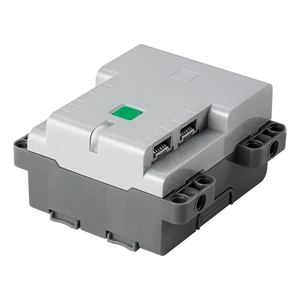
The Technic Hub is the four-port Bluetooth hub from Lego's Control+ sets. It takes six AA batteries, has a built-in tilt sensor, and Pybricks also reads a gyro from it. Lego has stopped selling it in its own shop, so check the offers above. A used hub from a Control+ set works the same, and we have found it a cheap way in.
The hub is only the brain. A first driving robot needs two motors that measure their own position, such as the Medium Angular Motor 88018 or the Large Angular Motor 88017, plus Technic beams and wheels from your collection. At list prices that is roughly $90 for the hub and $35 to $40 per motor, far below what SPIKE Prime cost new.
Two ways to program it are free. Lego's Powered Up app offers icon blocks in the style of the old Boost app, but your tablet has to stay connected while the program runs. Pybricks replaces the hub's firmware from the browser at code.pybricks.com, then you write Python and the program is stored on the hub. Once it is loaded, the model runs without a phone or computer, and that is when it starts to feel like a real robot. Python in Pybricks is free; block coding in Pybricks is for paying supporters. You can put the original firmware back at any time.
Pybricks needs Chrome or Edge on Windows, macOS, Linux, ChromeOS or Android. iPads and iPhones do not work, because no iOS browser supports Bluetooth for web pages, and neither does Firefox. If your child codes on an iPad, the Powered Up app is the route for now.
Which Lego robotics systems are still supported?
| System | Hub | Status in October 2026 | Lego software and support | Pybricks |
|---|---|---|---|---|
| SPIKE Prime 45678 | Large Hub, 6 ports | Retired, sales ended 30 June 2026 | SPIKE App until 30 June 2031 | Yes, Python free |
| SPIKE Essential 45345 | Small Hub, 2 ports | Retired, sales ended 30 June 2026 | SPIKE App until 30 June 2031 | Yes, Python free |
| Computer Science & AI kits | Double Motor, Single Motor, Color Sensor, Controller | Current, launched 2026 | Coding Canvas (web and iOS), Python package | No |
| Mindstorms Robot Inventor 51515 | Inventor Hub, 6 ports | Retired | Robot Inventor app ended 1 October 2026 | Yes, Python free |
| Mindstorms EV3 31313 | EV3 brick | Retired | EV3 Classroom extended only to 31 July 2026 | Only the older EV3 MicroPython |
| Boost 17101 | Move Hub, 2 ports and 2 built-in motors | Retired | Boost app withdrawn, Powered Up app instead | Yes, with limits |
| Powered Up City Hub 88009 | 2 ports | Spare part, availability varies | Powered Up app | Yes, Python free |
| Powered Up Technic Hub 88012 | 4 ports | Retired by Lego, still in shops | Powered Up app, set profiles in Control+ | Yes, Python free |
The Pybricks column matters more than it looks. Most Lego apps connect to one family of hubs, and when Lego retires the app, that hub loses its official route. Pybricks gives the City, Technic, Move, Inventor, Prime and Essential hubs one common Python editor, and it is open source, so it does not end with a Lego product decision.
SPIKE Prime and SPIKE Essential: retired, supported until 2031
SPIKE was Lego Education's robotics line for schools and the closest thing to a Mindstorms successor. Lego ended sales of SPIKE Prime, SPIKE Essential, the Prime Expansion Set and the spare hubs on 30 June 2026. Resellers can sell remaining stock, and Lego says it keeps hardware spare parts for two years after the last sale.
The SPIKE App stays supported until 30 June 2031. Until then, Lego fixes bugs and keeps it working on current versions of Windows, macOS, ChromeOS, Android and iOS, but adds no new features. After that date the app stays online without updates, so it may stop working on newer operating systems. Projects are saved on your own device, not in a Lego account. FIRST Lego League allows SPIKE robots up to and including the 2027-2028 season.
Programming works in three steps in the SPIKE App: icon blocks for younger children, Scratch-based word blocks, then Python. SPIKE Essential (449 pieces, aimed at grades 1 to 5) uses the two-port Small Hub. SPIKE Prime (523 pieces, grades 6 to 8) uses the six-port Large Hub with a light matrix display and a gyro. Both hubs also run Pybricks, which matters for a family that buys one secondhand and wants it to work past 2031.
Should you still buy one? If you find SPIKE Prime at or below its old list price of $399.95, it remains the most capable Lego robotics hub, with six ports, a gyro and a display. Paying well over list for a retired school set makes less sense when a Technic Hub and two motors do the same basic job.
Lego Education Computer Science & AI: the new classroom system
Lego's successor for schools is a different system. Lego Education Computer Science & AI was announced in January 2026 with three kits for grades K to 8, and Lego's US price starts at $339.95 per kit. Each kit is designed for a group of four and comes in a stackable box. The grades 3 to 5 kit, 45521, contains 321 bricks, a Double Motor and a Color Sensor. The older-grade kit adds a Single Motor and a Controller with two levers. There is no separate hub: the motors and sensors connect by Bluetooth on their own, and the Double Motor charges over USB-C.
You program it in Lego Education Coding Canvas, a web app also available for iOS, with icon and word blocks. Students need no login, and projects are saved locally. The curriculum includes AI lessons that use camera-based image recognition; Lego says images are neither saved nor shared. For older students, Lego publishes a Python package called legoeducation. It runs on your computer, not on the motor, needs Python 3.14 or newer and a Bluetooth connection Python can reach, so it does not work from the Linux container on a Chromebook.
The kits are sold through Lego Education resellers, not at the Lego Store. They make sense for a school or a club. FIRST Lego League accepts them from the 2026-2027 season. For a single child at home, one motor unit and one sensor is little hardware for the price. The Lego Education Science kits use the same motor and sensor family but are built for science lessons, and Lego does not sell them as a coding kit.
Mindstorms Robot Inventor 51515: the hub lives on, the app does not
Robot Inventor was the last Mindstorms set and left the shops at the end of the Mindstorms line. The Robot Inventor app was discontinued on 1 October 2026 and no longer receives updates or support. Lego's own transition path is the SPIKE App, but it says it cannot promise the same experience there.
The hardware is worth more than the app suggests. The Inventor Hub is the SPIKE Prime hub in a different colour with a different device number. Pybricks runs on it like on the Prime Hub, with six ports and the same Python editor, so a secondhand 51515 with its four motors and two sensors is still a strong Python robot. Lego's apps only connect to the hub colour they were made for, which is why Pybricks is the safer plan for this set. Installing Pybricks on this hub needs a micro-USB cable.
Mindstorms EV3: Python on a memory card
EV3 is older and works differently. The brick is a small Linux computer with its own connector, so EV3 motors and sensors do not plug into Powered Up, SPIKE or Robot Inventor hubs. Lego extended the EV3 Classroom app only to 31 July 2026, and Lego Education now lists the EV3 software under retired products.
What remains is Python. Lego Education still offers EV3 MicroPython: you write the image to a micro SD card, boot the brick from it and program in Visual Studio Code. It uses an older Pybricks version than the current hubs. ev3dev, the Linux system it is based on, can also run other languages. Removing the card brings back the original EV3 firmware. For teenagers who already own an EV3, this is a solid way to learn real Python. As a new purchase it is a dead end.
Boost 17101: a good hub for experiments
Boost was Lego's programmable robotics set for children from 7, with Vernie the robot and icon blocks in its own app. Lego says the Boost apps are no longer available to download; the Move Hub's functions now run in the Powered Up app. The Creative Toolbox building instructions are still in the Lego Builder app.
The Move Hub has two ports and two built-in motors, and it works with both the Powered Up app and Pybricks. That makes a secondhand Boost set or a loose Move Hub a cheap spare hub for small projects. Pybricks marks its limits: no gyro, the least memory of all supported hubs, and no decimal maths or random numbers. For a first Python program that rarely matters, but for a robot with several sensors you will reach the limit quickly.
Powered Up and Control+: the hubs from trains and Technic
The City Hub 88009 from Lego's trains and the Technic Hub 88012 from the Control+ sets share Powered Up's six-wire connector. Control+ is not a programming tool; the app has fixed control screens for particular sets. Programming happens in the Powered Up app or in Pybricks. The City Hub has two ports and no motion sensor. The Technic Hub has four ports and a tilt sensor, which is why we prefer it as a robot brain. Our Lego motor alternatives explain which motors fit which connector.
One newer product does not belong here. Lego's Smart Brick, sold in the Smart Play Star Wars sets since March 2026, reacts to play with sounds and lights, but Lego does not present it as something you program.
How programming a Lego robot works
Every system above follows the same progression, just with different apps:
- Icon blocks: pictures for motor, sound and wait. Children who cannot read fluently can still make a model move. Powered Up, SPIKE Essential and Coding Canvas start here.
- Word blocks: Scratch-style blocks with loops, conditions and variables. This is where real program logic begins, from about age 9 or 10.
- Python: text code. SPIKE App, Pybricks, EV3 MicroPython and the legoeducation package all use Python, so what a teenager learns carries over to every later system.
The second question is where the program runs. In the Powered Up app the tablet sends every command over Bluetooth, so the robot stops when the tablet does. SPIKE, Pybricks and EV3 MicroPython put the program on the hub, and the robot runs on its own after the upload. For a robot that drives around the room, that difference matters more than the language.
What a working setup costs
| Route | What you buy | List price | Software |
|---|---|---|---|
| Technic Hub and Pybricks | Hub 88012 plus two angular motors | About $90 plus $70 to $80 for two motors | Python free, blocks for Pybricks supporters |
| City Hub and Powered Up app | Hub 88009 plus motors | $49.99 plus motors | Free, tablet required |
| SPIKE Essential | Complete set 45345 | $319.95 when it was sold | SPIKE App free until 2031 |
| SPIKE Prime | Complete set 45678 | $399.95 when it was sold | SPIKE App free until 2031 |
| Computer Science & AI | One classroom kit | From $339.95 | Coding Canvas free, Python package free |
| Secondhand Robot Inventor or EV3 | Complete set | Secondhand prices vary | Pybricks or EV3 MicroPython, free |
The hub routes assume you already own Technic beams, axles and wheels. Add AA or AAA batteries, or rechargeables. With Pybricks you pay only if you want block coding: Pybricks sells annual and perpetual licences, or you can support it monthly through Patreon. A perpetual licence works offline and does not renew.
Which system suits which age
- Ages 6 to 9: icon blocks on a tablet. A City or Technic Hub with the Powered Up app is the cheapest start. A SPIKE Essential at a fair price also works and is supported until 2031. Schools should look at the Computer Science & AI kits for the younger grades.
- Ages 10 to 13: word blocks and the first sensors. SPIKE Prime with the SPIKE App, a secondhand Robot Inventor with Pybricks, or the Technic Hub with Pybricks blocks if you buy a licence. Clubs that want to compete in FIRST Lego League should plan for the Computer Science & AI kits.
- Teenagers and adults: Python. Pybricks on a Technic Hub, an Inventor Hub or a Prime Hub is the most direct route. Teenagers who already own an EV3 can use EV3 MicroPython.
App risk: what happens when Lego drops the software
The last four years show the pattern. The Boost app is gone, the Robot Inventor app ended in October 2026, EV3 Classroom is in the retired section, and SPIKE has a fixed end date in 2031. The hardware outlives the software every time. Before you buy, check three things: which app the hub needs, until when Lego supports that app, and whether Pybricks runs on the hub. Save programs as files on your own computer, not only inside an app.
Pybricks does not remove every risk, because it relies on browsers supporting Bluetooth. But it is open source, works offline once the page has loaded, and puts the program on the hub, where it keeps running whatever happens to the editor. That is why we would not buy any hub today that Pybricks does not support.
Lego robotics programming FAQ
Is there a replacement for Lego Mindstorms?
Not for the home. For schools, Lego Education Computer Science & AI replaces SPIKE, which had itself taken over from Mindstorms in classrooms. At home, the way forward is to program the hubs that already exist with Pybricks.
Can you still program Lego Mindstorms?
Yes. The Robot Inventor hub runs Pybricks with free Python, and Lego points owners to the SPIKE App, though without a promise of the same experience. An EV3 brick can be programmed in Python with EV3 MicroPython from a micro SD card. Lego's own Mindstorms apps are no longer supported.
Do you need a subscription to program Lego robots?
No. The SPIKE App, the Powered Up app, Coding Canvas and Python in Pybricks are free. Only block coding in Pybricks needs a paid licence or Patreon support.
Which Lego robot should you program?
- Starting from scratch at home: Technic Hub 88012 with two angular motors and Pybricks.
- Young children with an iPad: a City or Technic Hub with the Powered Up app.
- You find SPIKE Prime at a fair price: buy it; the app runs until 2031 and Pybricks after that.
- You own Robot Inventor 51515: move to Pybricks.
- You own EV3: EV3 MicroPython from a micro SD card.
- School or club: Lego Education Computer Science & AI.
If your child is more drawn to gears and mechanisms than to code, our fischertechnik vs Lego Technic comparison is the better next read, and for more Technic parts at lower prices see our Lego Technic alternatives.