Since Lego moved its Collectible Minifigures into cardboard boxes, feeling the packet no longer tells you anything. The bottom of each box does, though. For every series since Series 25, a free or freemium scanner app such as Brick Search, Minifig Scan, omgbricks or the Brickbank CMF Code Scanner reads the small square code next to the barcode and shows the figure inside; for a loose figure without a box, you need a photo recognition app instead.
None of these scanners comes from Lego. We know of no official Lego app that identifies a figure in a sealed box, so every tool in this guide is built by fans or independent developers and depends on codes collected after each launch. We have scanned boxes in shops ourselves since Series 25. The Shrek Series came out after our last round of shop scanning, so for that series we rely on what the app makers say.
What identifies the figure: from bags to boxes
| Series and packaging | What gives the figure away | Does a scanner app work? |
|---|---|---|
| Series 1 and 2 (2010), foil bags | A second, figure-specific barcode on the back of the bag | Historically yes; Lego removed it from Series 3 |
| Series 3 and 4, foil bags | A pattern of embossed dots in the bottom seal, known as bump codes | No; you compare the dots with a chart |
| Later bagged series up to 2023 | No marking; only the shape of the parts | No; you feel the bag |
| Marvel Studios Series 2 (71039, 2023), first cardboard boxes | A small printed code that does not name the figure | Only as an estimate |
| Series 25 (71045, 2024) | Small code in the first batch, large code after that | Yes for the large code |
| Series 26 to Series 29 and the Shrek Series (71046 to 71053) | Large square code beside the barcode | Yes |
Lego switched from foil bags to cardboard boxes with Marvel Studios Series 2 in September 2023. The box ended the feel method, because the parts sit loose inside and you cannot make out a sword or a hat through card. Since 2021, each regular series has had 12 figures, so a scanner has 12 answers to choose from.
How to scan a minifigure box
Turn the box over. On the bottom you will find the normal product barcode and, to the right of it, a small square code that looks like a QR code. Technically it is a Data Matrix code. That square is what the apps read. The long barcode only tells you the product number of the series, which is the same on every box.
Hold the phone about 15 cm from the box and keep both still until the camera focuses. Most apps show the figure's name or picture over the code within a second. Several apps can read a whole row of boxes at once if you stack them and move the phone slowly along the bottoms. That is how we work through a full shop display.
Large code and small code
The code comes in two sizes, and they do not hold the same information. The large code contains a seven-digit number that belongs to one figure, so the app can look the figure up directly. The small code, which Marvel Studios Series 2 and the first batch of Series 25 carried, does not hold that figure number. Apps can only estimate the figure from production data that collectors have reported, and on those boxes we saw wrong guesses regularly.
Early in 2024, shops had both versions of Series 25 on the shelf, sometimes mixed in one display. From Series 26 onward, every box we came across carried the large code. If an app fails on a box, check the size of the square first.
Boxes for Europe and North America
Lego packs Collectible Minifigures in two factories: the Czech Republic for Europe and the UK, and Mexico for North America. A short five-character code is printed under the square, and its fourth character shows the factory: S for the Czech Republic, R for Mexico. The figure numbers differ between the two. An app that has only collected North American numbers will not recognise a European box, and the other way round. Brick Search, for example, first had the F1 Collectible Race Cars codes from US boxes and added the UK codes later.
Which scanner app to use
| App | Phones | What scanning costs | Worth knowing |
|---|---|---|---|
| Brick Search | iOS, Android | Free app; unlimited scanning with a Brick Search Plus subscription | Reads several boxes at once and also works offline |
| Minifig Scan | iOS, Android | Free, with in-app purchases | Fast with several boxes in view, in our experience |
| omgbricks | iOS, Android | Free, unlimited scans according to the maker | Has a checklist; the maker's own scan guide lists older series |
| Brickbank CMF Code Scanner | Browser, iOS, Android | Free | Runs in the browser without an install; warns about known faulty batches |
All four do the same basic job, so the series list decides. Before you go to a shop, open the app's list and check that it covers the series you are hunting and the region you are in. In our experience, a brand new series is not in every app on launch day. When the F1 Collectible Race Cars arrived in 2025, one of the apps we used still had no codes for them, while another already did. With Series 29, we waited for a data update before scanning worked.
A browser tool is handy when you do not want to install anything, but the browser has to handle the camera. On Android phones, we had better results in a different browser than the preinstalled one, and the Brickbank page itself suggests Firefox. Phones with several lenses sometimes struggle to switch to close focus, so move the box further away rather than closer. If the shop has poor reception, an app that also scans offline saves you from carrying boxes to the door to get a signal.
When the scanner shows the wrong figure
A scanner is right far more often than not, but not always. These are the cases we have run into:
- Small codes: On Marvel Studios Series 2 and early Series 25 boxes, the app is estimating. Treat the result as a hint.
- Faulty batches: In autumn 2024, some Dungeons & Dragons boxes from particular production dates carried the code of a different figure. Two figures were affected. The apps added warnings for those batches once collectors reported them.
- Missing region or new series: If the app says it does not know the code, the series may be too new, or your box may come from the other factory.
- Covered codes: Some shops put their own price labels over the square, which makes the box unreadable.
If a result matters, for instance because you are buying one specific figure for a full set, scan the box twice and look at whether the app shows a warning. Once you open a box, you can report a mismatch to the app maker with a photo of the bottom. The apps depend on these reports.
Weighing and feeling: the old methods
With the bags, feeling was the method. With practice, almost every bag could be identified by touch, although some collectors never got the hang of it. A figure packed in its own inner bag, such as the Orc and the Falconer in Series 24, could be picked out in seconds. Bump codes worked only for Series 3 and 4, and later bags had no marking at all.
A precision scale reading to 0.01 g is the fallback for boxes. In practice it is unreliable, because the card and the glue vary from box to box, and that spread is often larger than the weight difference between two figures. On boxes with the small code we used weighing as a second opinion. With the large code you do not need it.
Current series you can scan
Series 29 (71052)
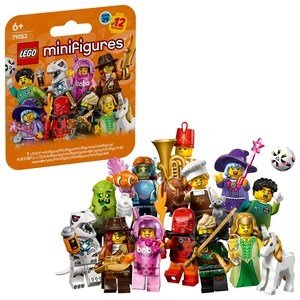
Series 29 came out on 1 May 2026 with 12 figures, including a Bionicle Cosplayer and a Robot T. rex. The boxes carry the large code. In a sealed retail box of 36 that we opened, every figure was there three times, so a full display gives you three complete series. The six-box pack of Series 29 (66814) holds six random boxes and cannot complete the series on its own.
Shrek Series (71053)
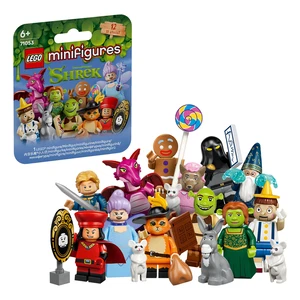
The Shrek Series has been in shops since 1 September 2026, with 12 characters, among them Shrek, Fiona and Lord Farquaad. Brick Search says its scanner reads these boxes. We have not scanned this series ourselves, so check your app's series list before you go.
Scanning in the shop
Ask before you scan. Shops handle it very differently. In Lego Stores we have visited, scanning was accepted, although the staff will not scan for you. Some shops in Scandinavia even pointed customers to the apps. Other retailers banned scanning, kept the boxes behind the till, covered the codes or sold only sealed displays of 36. It is the shop's decision.
Leave the display tidy and never open a box in the shop. Many displays we came across had torn boxes, and a box you can see into is still unsellable as new. If you only want one complete series, a sealed box of 36 is often the calmer route. A full set of 12 bought from a reseller can be checked with the scanner when it arrives, before you open anything.
Loose minifigures: identify them by photo
A scanner for boxes does not help with a figure you already own or found in a used lot. For that you need photo recognition. BrickScan, formerly BrickMonkey, says it recognises over 16,000 minifigures and 76,000 parts from a photo. Brickognize, a website, identifies parts and minifigures from an uploaded picture and links matches to the BrickLink catalogue.
In our experience, these apps recognise most loose parts roughly from a quick shot, while printed heads and torsos need a separate, careful photo. Parts that were released very recently can be missing from the database. In used lots, many figures have been rebuilt from mixed parts, so start with the torso, which has the most distinctive print, and then check head, legs and accessories against the matching entry in the BrickLink catalogue.
Once you know which figure you have, three more questions usually follow. Our guide to spotting fake Lego minifigures shows how to tell a real figure from a copy. For a price, see how much your Lego is worth, and our list of the most expensive Lego minifigures shows what the top of the market looks like.
Lego minifigure scanner FAQ
Is there an official Lego minifigure scanner?
No. We know of no Lego app that identifies the figure in a sealed box. Brick Search, Minifig Scan, omgbricks and the Brickbank CMF Code Scanner are independent tools, and the codes they use were collected by fans.
Can a scanner app read old minifigure bags?
Not the bags from Series 3 onward. Only Series 1 and 2 had a figure-specific barcode. For later bagged series, you are left with bump codes for Series 3 and 4 and with feeling the bag.
Why does my app not recognise the box?
The box may have the small code, it may come from the other factory region, the series may be too new for the app, or the code may be covered or damaged. Check the size of the square and the app's series list first.
Does a box of 36 contain three complete series?
In the boxes we opened, yes: every figure of the 12 appeared three times. A box from a shop shelf that others have already scanned may be missing the popular figures.
Which method fits your minifigure?
- Box from Series 26 onward, including Series 29 and Shrek: scan the large square code with any of the four apps.
- Series 25 box: scan it; if the square is small, treat the result as an estimate.
- Marvel Studios Series 2 box: only estimates are possible; a precision scale helps a little.
- Bag from Series 3 to 2023: feel the parts, or use the bump codes for Series 3 and 4.
- Loose figure: photo recognition, then the BrickLink catalogue, starting with the torso.
If your scanned figures end up on a shelf, our guide to Lego minifigure display cases compares the options by capacity and dust protection.