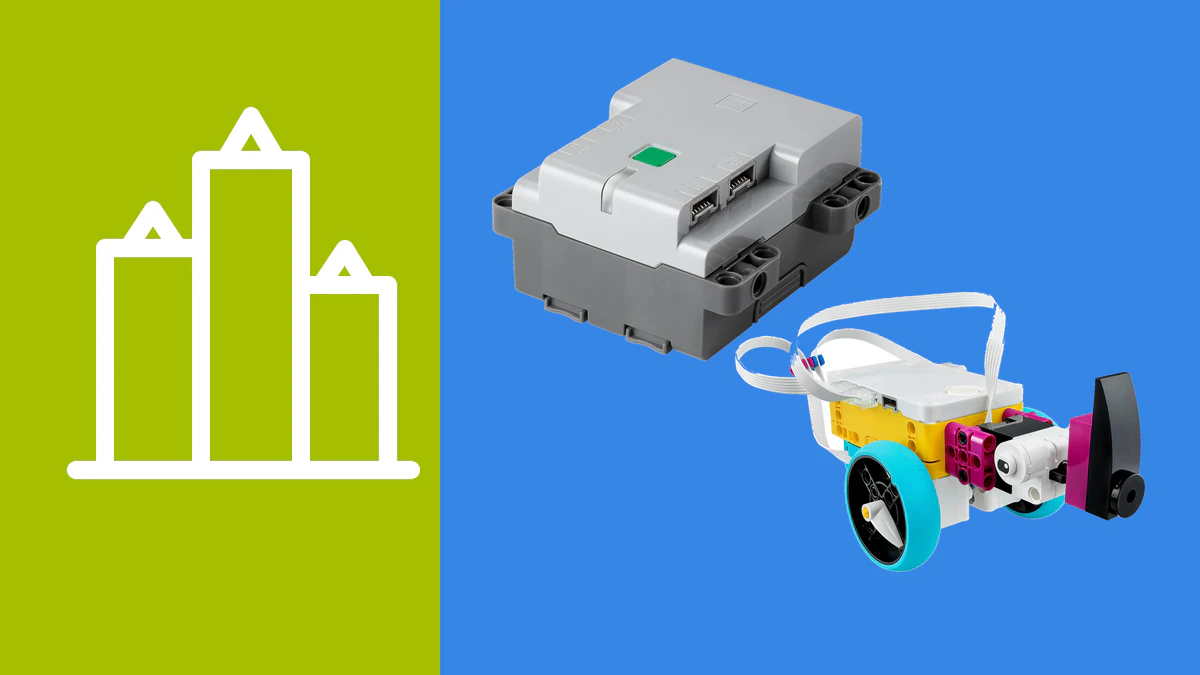
Mindstorms was more than a motorized construction toy. Its defining loop was to build a mechanism around a programmable controller, read sensors, test behavior and improve both the model and its code. We therefore excluded ordinary remote-control toys, static electronics assortments and expansion packs that cannot operate as a robot on their own.
The eight US-market recommendations below cover several legitimate routes into robotics. Some are modular building systems, some are ready-made teaching robots, and others expose Arduino, micro:bit or Raspberry Pi hardware. None reproduces the complete combination of Lego elements, Mindstorms electronics, software and lessons.
We checked the exact linked Amazon.com variants rather than assuming that two similar titles contain the same parts. This matters especially for micro:bit and Raspberry Pi cars: several listings omit the main board or batteries. The included-hardware notes below describe the linked product, not a better-equipped bundle from the same family.
The 8 current Lego® Mindstorms alternatives
1. WhalesBot E7 Pro
Construction: Modular construction robot
Controller: Smart controller
Movement and sensing: Controller, sensors and motors in the E7 Pro bundle
Programming: Modular coding and Scratch
Best for: Build-and-code projects
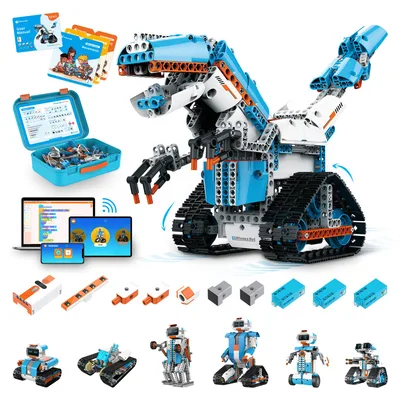
WhalesBot E7 Pro is the most construction-led choice in this US list. The linked bundle combines a smart controller, sensors, motors and modular parts, and it is sold for coding as well as remote-controlled projects. That gives learners more freedom to change the mechanism than a sealed robot provides.
Its useful Mindstorms-like loop is to build, place sensors, run code, diagnose the result and rebuild. Scratch-oriented and modular programming lower the first barrier, while the supplied controller keeps the projects within one documented ecosystem.
The trade-off is ecosystem dependence. WhalesBot parts, software and support channels are their own system, not a promise of Lego mechanical or electrical compatibility. Confirm device support and the language of current learning materials before classroom rollout.
2. BirdBrain Finch Robot 2.0 with micro:bit
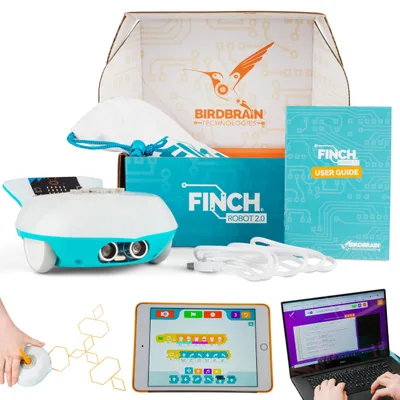
Construction: Ready-made coding robot
Controller: BBC micro:bit included
Movement and sensing: Drive, lights and built-in sensing platform
Programming: Blocks, Python and several supported languages
Best for: Repeated coding sessions
Finch Robot 2.0 removes almost all mechanical setup. The exact linked package includes the micro:bit and a complete mobile robot, so a learner can spend time on programs rather than aligning wheels or debugging loose motor wires. It is offered for a broad age range and multiple coding environments.
BirdBrain documents several language routes, including visual tools and Python. That breadth makes Finch useful when one physical platform must follow learners from first commands to text code. A sturdy, repeatable base is also practical when many students share hardware.
Finch is not a construction system. You can add craft materials and projects, but it does not recreate the beam, gear and custom-mechanism side of Mindstorms. Choose it when coding iteration matters more than rebuilding the chassis.
3. ELEGOO Conqueror Robot Tank Kit
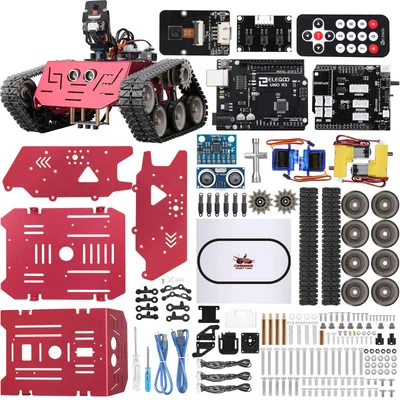
Construction: Tracked Arduino kit
Controller: UNO R3 included
Movement and sensing: Tracked drive, camera and robotics modules in the Conqueror kit
Programming: Arduino-compatible coding
Best for: Assembly and tracked motion
The exact Amazon.com product is the ELEGOO Conqueror Robot Tank Kit with UNO R3, not the visually similar Smart Robot Car V4 sold in some European markets. It uses a tracked chassis and exposes the controller, motors and modules during assembly.
The included UNO R3 places the project in the Arduino ecosystem. Learners can begin with supplied examples, then inspect sketches and libraries as they change driving and sensing behavior. Tracks also create different motion and traction experiments from ordinary two-wheel cars.
This is electronics-led construction rather than a reusable brick system. Assembly, charging and wiring take more care than a ready-made robot. Use the exact Conqueror documentation because instructions for other ELEGOO cars do not prove this variant's contents.
4. ELEGOO Tumbller Self-Balancing Robot Car
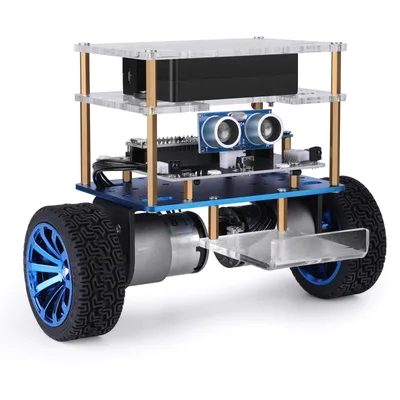
Construction: Self-balancing Arduino robot
Controller: Controller included in the kit
Movement and sensing: Two-wheel balancing platform and control electronics
Programming: Arduino-compatible coding
Best for: Control-system experiments
Tumbller is designed around a different problem: keeping a two-wheel robot balanced. The exact kit is sold as an Arduino-compatible self-balancing robot car. That makes feedback and tuning more visible than on a four-wheel chassis that remains upright by itself.
A learner can connect sensor readings, motor output and control logic to a behavior that is immediately obvious. The supplied platform avoids designing the balancing frame from scratch, while the code can still be inspected and modified.
It is a specialized robot, not the broadest first construction set. Incorrect calibration or assembly can be frustrating, and the useful lessons are strongest for users ready to reason about feedback rather than simply drive an app-controlled toy.
5. ELECFREAKS Cutebot Pro
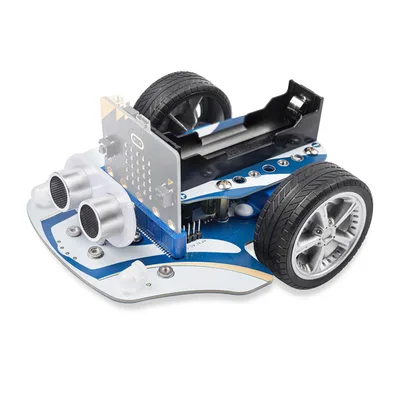
Construction: micro:bit robot car
Controller: BBC micro:bit required
Movement and sensing: Encoded motors and 4 line-tracking sensors
Programming: MakeCode; Python for suitable micro:bit projects
Best for: Owners of a micro:bit
Cutebot Pro is a compact chassis for the BBC micro:bit. The linked Pro version includes encoded motors and four line-tracking sensors, giving it more measurable movement options than the basic Cutebot. Its expansion points support further micro:bit experiments.
Microsoft MakeCode provides the common block-based path, while suitable projects can move to Python on the micro:bit. The large micro:bit community makes it easier to reuse general lessons even when they were not written specifically for Cutebot.
The exact Amazon.com listing does not include a micro:bit or batteries. Buyers must add those parts. That omission is acceptable for an existing micro:bit owner but changes the real cost for a first-time robotics learner.
6. KEYESTUDIO 4WD Smart Car with micro:bit V2
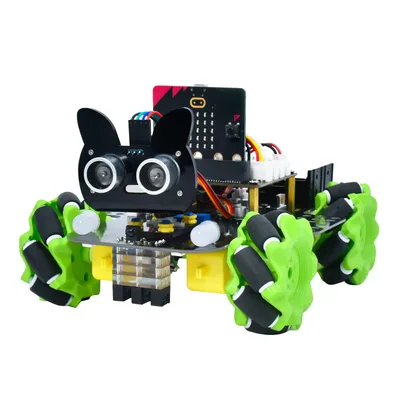
Construction: Complete micro:bit car kit
Controller: BBC micro:bit V2 included
Movement and sensing: 4WD chassis with IR remote and app-control hardware
Programming: MakeCode and Python
Best for: A complete micro:bit start
KEYESTUDIO's US-market 4WD kit includes the BBC micro:bit V2. It is a conventional four-wheel car rather than the Mecanum-wheel variant linked in several European locales, so the image, ASIN and nearby description deliberately identify this exact version.
The product supports MakeCode and Python projects and includes an IR remote and app-control route for initial checks. Because the board is supplied, a beginner can follow one kit-specific bill of materials instead of matching a separate micro:bit purchase.
A four-wheel electronics kit still requires methodical assembly. Use the wiring and software for this ASIN's revision, and do not assume that extensions made for another KEYESTUDIO car share the same pin map.
7. Freenove 4WD Smart Car for Raspberry Pi
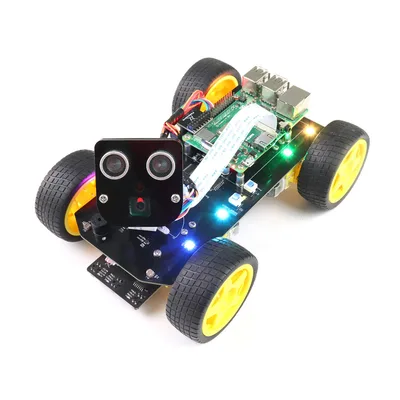
Construction: Open Raspberry Pi car
Controller: Raspberry Pi sold separately
Movement and sensing: 4WD chassis, camera, servo and robotics modules
Programming: Python and app projects
Best for: Advanced maker projects
Freenove's 4WD Smart Car uses a Raspberry Pi as its computer. The linked kit supports Raspberry Pi 5, 4 B, 3 B+ and Zero 2 W and supplies a chassis, motors, camera, servo and hardware for line, light and obstacle projects. Freenove publishes tutorials for assembly and code.
Linux, Python, networking and camera access create a much more open environment than a closed teaching app. They also add failure points: operating-system images, packages, power, wiring and network settings must all agree. Patient teenagers and adults can learn a great deal from that stack.
The Raspberry Pi is explicitly not included. A compatible board, storage and suitable power arrangement are required before this becomes a working robot. Do not compare its chassis price with complete products without adding those items.
8. ELEGOO Owl Smart Robotics Car Kit V2.0
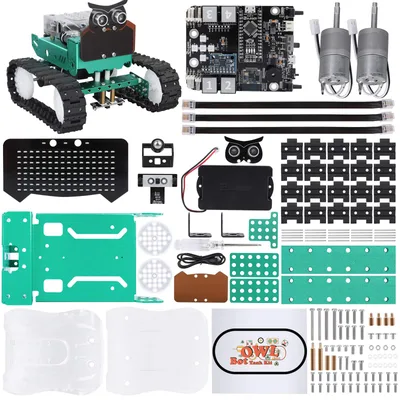
Construction: Compact Arduino robot car
Controller: Nano-class controller in the V2.0 kit
Movement and sensing: Drive and sensor modules in the Owl kit
Programming: Arduino-compatible coding
Best for: Compact electronics projects
The Owl V2.0 is the third ELEGOO product here, but it fills a smaller, wheeled role than Conqueror or Tumbller. The exact listing identifies the V2.0 Nano-based smart robotics car and supplies the matched chassis and electronics as one kit.
It suits learners who want hands-on Arduino-style assembly without the larger tracked footprint. Supplied examples can verify each module before code is combined into complete behaviors, a useful debugging habit that also applied to Mindstorms projects.
Because several ELEGOO robots look similar in search results, use only the Owl V2.0 instructions for this product. A picture or brand match does not establish the same controller, sensor set or pin assignment.
Mindstorms is discontinued, and SPIKE is not a simple replacement
Lego ended Mindstorms at the end of 2022, including Robot Inventor 51515. Used sets and spare components remain in circulation, but availability on a marketplace is not evidence of current product support. A new buyer should not base a long project on indefinite updates to the retired Mindstorms app.
SPIKE Prime was the obvious education-side relative, but Lego Education now marks set 45678 as retired. Lego says that the SPIKE app and related teacher resources will remain supported until June 30, 2031. Existing classrooms have a defined runway; a first-time buyer still needs to consider what happens after that window and whether a retired kit is sensible to source.
For that reason, this refresh favors products that were presented as current and buyable in the US marketplace check. “Current” is not a lifetime guarantee. Before deployment, confirm the manufacturer's present download page, the operating-system versions you intend to use, and whether accounts or network access are required for your chosen workflow.
How we selected these 8 robotics systems
A qualifying alternative needed a programmable controller or computer, controllable movement, and a documented sensor or input path. A toy that only follows a fixed remote, a mechanical coding wheel, or a box of motors without a programmable brain did not qualify.
We compared the exact package, recommended age or assumed experience, construction system, block and text coding paths, app or desktop requirements, expansion possibilities, documentation, and required extras. We did not score temporary prices. Value is judged against the complete working system, including a missing micro:bit, Raspberry Pi, battery pack or power supply.
The order moves from guided modular products toward maker-oriented kits. It is not a universal numerical ranking. A family replacing the build-and-rebuild experience should prioritize a durable construction system. A learner interested in Python, embedded electronics or computer vision should prioritize accessible hardware and documentation instead.
| No. | Product | Construction | Controller | Programming | Best suited to |
|---|---|---|---|---|---|
| 1 | WhalesBot E7 Pro | Modular construction robot | Smart controller | Modular coding and Scratch | Build-and-code projects |
| 2 | BirdBrain Finch Robot 2.0 with micro:bit | Ready-made coding robot | BBC micro:bit included | Blocks, Python and several supported languages | Repeated coding sessions |
| 3 | ELEGOO Conqueror Robot Tank Kit | Tracked Arduino kit | UNO R3 included | Arduino-compatible coding | Assembly and tracked motion |
| 4 | ELEGOO Tumbller Self-Balancing Robot Car | Self-balancing Arduino robot | Controller included in the kit | Arduino-compatible coding | Control-system experiments |
| 5 | ELECFREAKS Cutebot Pro | micro:bit robot car | BBC micro:bit required | MakeCode; Python for suitable micro:bit projects | Owners of a micro:bit |
| 6 | KEYESTUDIO 4WD Smart Car with micro:bit V2 | Complete micro:bit car kit | BBC micro:bit V2 included | MakeCode and Python | A complete micro:bit start |
| 7 | Freenove 4WD Smart Car for Raspberry Pi | Open Raspberry Pi car | Raspberry Pi sold separately | Python and app projects | Advanced maker projects |
| 8 | ELEGOO Owl Smart Robotics Car Kit V2.0 | Compact Arduino robot car | Nano-class controller in the V2.0 kit | Arduino-compatible coding | Compact electronics projects |
Choosing the right Mindstorms replacement
Start with the experience, not the longest feature list
WhalesBot offers the closest option here to constructing several mechanisms around one controller. Finch is the opposite: the robot arrives as a robust platform so class time can go directly into code. ELEGOO's tracked and self-balancing robots put more assembly and electronics between those two approaches.
Decide between blocks and text code
A visual editor reduces the initial syntax burden, but the route after the first projects matters. Finch supports a broad software ecosystem, WhalesBot uses guided modular coding, and micro:bit projects can move from MakeCode to Python. Arduino-compatible ELEGOO kits are strongest when a learner is ready to read sketches, libraries and wiring documentation.
Check the exact computer and device requirements
A product page may say “app control” without promising every programming feature on every phone. Classroom computers can also block drivers or editor installation. Verify the specific browser, desktop application or mobile app you plan to use, then test one unit before buying several.
Understand what “Lego compatible” does not mean
None of these products is an official drop-in Mindstorms electrical system. A maker may design brackets or combine beams mechanically, but connector shapes, voltage, communication protocols and software are separate questions. Never connect electronics merely because parts appear to fit.
Budget for required extras
The linked Cutebot Pro explicitly excludes the micro:bit and batteries. The Freenove Raspberry Pi car excludes the Raspberry Pi. The WhalesBot, Finch and selected ELEGOO packages are more self-contained, but you still need a suitable coding device and may need batteries or charging equipment. Compare a working bench setup, not only the box price.
Conclusion
There is no single modern kit that inherits every Mindstorms strength. WhalesBot is the strongest construction-led choice in this US selection, while Finch makes repeated coding sessions easy because the platform is already assembled. ELEGOO provides several increasingly technical Arduino routes; Cutebot and KEYESTUDIO make micro:bit the center of the system; Freenove is for users willing to add a Raspberry Pi and work through a more open stack.
Treat the package list as part of the product name. Confirm the controller, motors, sensors, battery arrangement and required board before ordering. That one check prevents the most common mismatch: buying a chassis or expansion kit while expecting a complete programmable robot.
If your priority is compatible construction rather than robotics, compare the broader options in our guide to Lego alternatives. For complex mechanical models, our Lego Technic alternatives guide is a better next step.