A Lego light kit is a set of tiny LEDs on hair-thin cables that you fit into a model you have already built, plus the boards, cables and power supply that connect them. The kits in this guide come from independent makers, not from Lego, and most are designed for one particular set. Buy a kit made for your exact set number, decide early whether it runs on USB or batteries, and expect fiddly wiring; for the Lego Titanic, our pick is the Briksmax kit for set 10294.
We have fitted Briksmax and Lightailing kits ourselves, mostly in modular buildings and Christmas village houses. We have not installed the Titanic kit below, so what we say about it comes from the listing. What we say about installation and power comes from our own builds.
Our pick for the Lego Titanic: a kit made for set 10294
Briksmax light kit for the Lego Titanic 10294: one kit for the whole ship
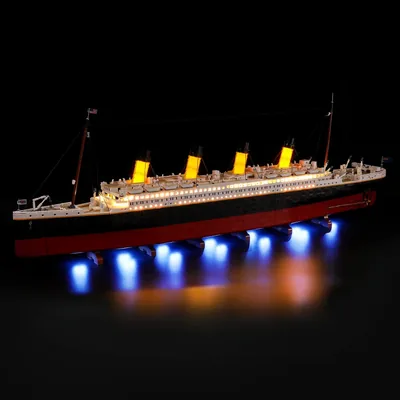
- Made for: Lego Titanic 10294 (maker's part number BX476); the Lego set is not included
- In the box: dot lights, expansion boards, connecting cables, a battery holder, adhesive squares and instructions, according to the listing
- Power: batteries (not included) or USB at 5 V; Briksmax recommends USB
The Titanic is one of the sets where a light kit changes the most. The ship is long and dark, with rows of portholes, deck houses and four funnels that do nothing at night without light. Briksmax designed this kit for 10294 alone, so the lights come with instructions that show where each one goes in this particular ship.
Two things favour a set-specific kit here. First, the instructions route the cables for you, and on a model this long that saves a lot of guesswork. Second, the kit runs on batteries or USB, so you can start with batteries and switch to a USB adapter once the ship has its final place. In the modular buildings we lit, Briksmax kits were also the less fiddly of the two big brands to install. That is our impression across several kits, not a test.
Lego Titanic 10294
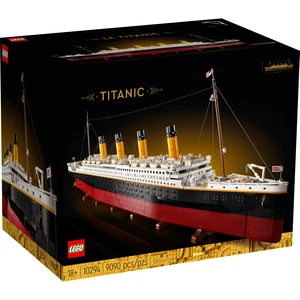
Plan the power before you start. Lego states the ship at over 135 cm long, and it is built in three sections. The battery holder or the USB cable leaves the model at one point, so decide which end of the ship faces the socket or where the battery holder can hide. If the Titanic is going into a case, our guide to Lego display cases gives the inner size it needs, and the cable has to leave the case too.
Lightailing also makes a Titanic kit. Its listing describes three light strips, a hand-sweep sensor switch and a battery box for three AA batteries or USB. Light My Bricks sells one through its own shop, with 53 lights and a 5 V, 2.4 A power requirement. We have not fitted either.
How a Lego light kit works
Every kit is built from the same few parts. Knowing them makes product listings much easier to compare.
- Dot lights: a single tiny LED at the end of a thin cable. They go inside lamps, under roofs, behind windows and into transparent parts.
- Strip lights: several LEDs on a flexible strip, usually with an adhesive back. They light a whole room or the underside of a floor.
- Expansion boards: small boards with several sockets. Every light plugs into a board, and the boards connect to each other and to the power supply.
- Connecting cables: cables with a small plug at each end, in different lengths, to bridge the distance between boards.
- Effect boards and modules: optional parts for flickering fire, blinking lights, remote control or sound.
- Power supply: a battery box, a USB cable, or both.
The plugs are tiny and fit only one way round. Do not force them. If a plug sits too tight to remove, pull it out with tweezers by the plug, never by the cable.
The lights are held in one of two ways. Some kits use adhesive squares or strips with an adhesive back. Others clip the light into a Lego part or include small plates and bricks to hold them. Put adhesive on hidden surfaces only, such as the underside of a plate or the inside of a wall. Some kits include their own bricks and plates for mounting. If you want only original Lego parts in your model, check whether the listing says the parts are Lego or compatible; not every maker says so.
Running cables through a finished model
The cables are thin enough to run between two bricks. In our displays, kits with cables pressed between bricks have kept working for a couple of years. Lego bricks are not made for anything between them, though, so a cable can lift a brick by a fraction of a millimetre. Where you can, run cables through gaps, along edges, under tiles or through hollow parts instead of across a row of studs on a visible wall.
Some makers write instructions for a finished model, and you open up only certain sections. With others, you take sections apart and rebuild them around the cables. Download the instructions before you buy if the maker publishes them, and you will see which kind you are getting.
USB, batteries or a mains adapter
Most kits run on 5 V. They come with a battery box, a USB cable or both, and the right choice depends on where the model stands.
Batteries suit models without a socket nearby and anything that moves, such as a train. The battery box has to be hidden somewhere in or near the model, and you will be changing batteries. Briksmax recommends USB for the best effect.
USB suits a model that stays in one place. A USB wall adapter, a laptop or a power bank will run it. In our own builds, we have also left out the battery box and plugged the kit's cable straight into a USB adapter. Check the rating: Light My Bricks advises 5 V adapters with an output of no more than 4 A. Its Titanic kit is designed for a 5 V, 2.4 A input, so check that your power bank or adapter delivers that.
USB pays off when several kits run at once. We run a whole Christmas village from one multi-port USB hub with a separate switch for each port, so every house can be switched on its own. Another setup that works for us: USB extension cables under the shelf, all going into one multi-socket USB charger. Light My Bricks also sells a connection kit with a six-port expansion board that runs up to four of its kits from one USB cable.
Remote control and sound are optional extras. Some makers sell remote-control versions of a kit or add-on modules. Game of Bricks, for example, uses four-pin cables for remote and music modules, where its standard cables have two pins. Lightailing's Titanic kit has a hand-sweep sensor instead of a switch. If you want these features, check before you buy whether the maker offers them for the kit for your set.
A kit for one set or a universal kit?
A set-specific kit is made for one set number. The lights, cable lengths and instructions match that model. This is the easy route, and it is the right one for large display sets such as the Titanic or a modular building. Check the set number carefully: kits for an older version of a model do not automatically fit a newer one, and some makers sell a second version of their kit for the same set.
A universal kit is a box of dot lights, strips, boards and cables without instructions for a specific model. It suits your own builds, older sets for which nobody makes a kit, or adding a few lights to a scene. You decide where everything goes and how long each cable has to be, so it takes more planning. One universal kit is often enough for several small models.
Briksmax, Lightailing, Light My Bricks and others
The makers differ in how they sell, what their kits connect to and how much they explain. Brickfact has fitted kits from the first three brands in the table; for the others, the information comes from their own listings.
| Brand | Where it sells | Power | What stands out | Our experience |
|---|---|---|---|---|
| Briksmax | Amazon and its own shop | Batteries or USB, 5 V | Kits for many current sets, plus single parts | Fitted in modular and Christmas buildings |
| Lightailing | Amazon and its own shop | Battery box or USB | Contacts between floors in newer modular kits | Fitted in modular and Christmas buildings |
| Light My Bricks | Its own shop | USB, 5 V, adapters up to 4 A | Wireless connectors between floors, instructions for finished models | Fitted in Christmas buildings |
| Game of Bricks | Its own shop | USB | Two-pin and four-pin cables; four-pin for remote and music modules | Not tested by us |
| Vonado | Online marketplaces | USB or batteries | Kits for many sets, some with extra modules | Not tested by us |
Briksmax or Lightailing?
These are the two brands you will meet first on Amazon, often with a kit each for the same set. Both run on batteries or USB, and both sell kits for many large display sets. In our builds, Briksmax kits were the less fiddly to install, while Lightailing's newer modular kits have the better answer to removable floors. Neither wins every set, because the kits are designed set by set.
Two differences we noticed ourselves are worth checking for your set. First, the effects vary from kit to kit. One kit we fitted had no flickering effect at all, while in a diner kit the jukebox blinks in several colours. Watch each maker's video for your set before choosing. Second, the cables are not the same thickness even within one brand. The one time a strand of ours stayed dark, the cause was a kinked cable.
Light My Bricks or Game of Bricks?
Both sell mainly through their own shops, not Amazon. Light My Bricks is an Australian company, founded in 2015 and based in Melbourne. It is the one to look at if you want to keep separating your models after the lights go in: its wireless power connectors sit between the floors of a building, so a floor lifts off without unplugging anything. Game of Bricks puts the emphasis on add-ons: its four-pin cables carry data as well as power for remote control and music modules, and it offers a two-year warranty. We have not tested Game of Bricks, so this comparison is based on the makers' own information. Whichever you choose, check delivery costs and whether import charges are included before you order from a shop outside your country.
Lighting a modular building
Shopping Street 11371
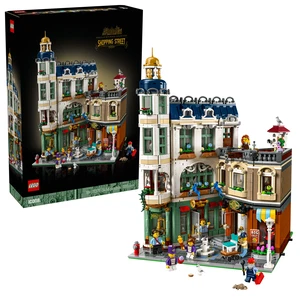
Modular buildings are built floor by floor, and the floors lift off. That is how you show the interiors, and that is also where a light kit can cause trouble: if the cables from the upper floors run down to a board on the ground floor, the floors are tied together. Shopping Street has 3,456 pieces and stands over 36 cm high, so cables from the top floor have a fair way to go.
Check how a kit handles the floors before you buy. Lightailing's newer modular kits and Light My Bricks use contacts between the floors, so the power passes through when one floor sits on another and stops when you lift it. Kits without contacts need a plug at each floor that you undo first, or a long cable you have to manage. We once ran a cheap fairy light through a row of houses. It looked good, but the houses no longer came apart.
Our guide to buying a first Lego modular building covers space and budget for the series, and our guide to Lego display shelves helps if several buildings will stand in a row. A USB hub on the shelf is the simplest way to power them all.
Less light usually looks better
Our most common complaint about light kits is that they are too bright. Many kits light interiors like a shop window, and some put lights in places that make no sense, such as a tree in front of a building. You do not have to install every light in the box. Leave out the ones that look wrong, prefer warm white for interiors and keep blinking effects for Christmas sets. Which Winter Village houses and other Christmas sets work best as decorations is in our list of Lego Christmas decorations.
Two more points from our own displays. If children play with a set, opening walls and roofs, leave the lights out, because the cables will not survive it. And add up the cost: a kit for a large set can cost a fair share of what the set itself cost.
A kit is also not the only way to light Lego. A display case with lights in the frame lights the model from outside without a single cable inside it. Our guide to Lego display cases covers the sizes. If you want lights as part of the model from the first step, building sets with integrated lighting are a different purchase: our guide to Lumibricks and Lego compares them.
Lego light kit FAQ
Do I need to solder to install a Lego light kit?
No. The kits in this guide use plug-in cables and boards. You plug the lights into expansion boards, connect the boards and connect the power. A pair of tweezers helps with the small plugs.
Can several light kits run from one power supply?
Yes, over USB. A multi-port USB hub or charger runs several kits, and a hub with a switch on each port lets you turn models on one at a time. Some makers also sell connection kits that link several of their kits to one USB cable. Stay within the current the maker allows.
Are Lego light kits made by Lego?
Not the ones in this guide. Briksmax, Lightailing, Light My Bricks and the other brands here are independent companies that design kits for specific Lego sets. Check the set number and the version of the kit before you order.
Which Lego light kit should you buy?
- Lego Titanic 10294: the Briksmax kit for set 10294, on USB if a socket is nearby.
- A modular building: a set-specific kit with contacts or plugs between the floors, so the floors still lift off.
- A Christmas village or a row of buildings: set-specific kits for each house, all on one switched USB hub.
- Your own builds or older sets: a universal kit with dot lights, strips and boards.
- Remote control or sound: decide before you buy, and choose a maker that offers these modules for its kits.
Sets you are not displaying belong in a box; our Lego storage ideas cover the rest of the collection.